STRAIGHT THROUGH AND CROSS-OVER CABLE
STRAIGHT-THROUGH AND
CROSS-OVER CABLE
Type A pattern of Network Cable:

- Orange-white
- Orange
- Green-white
- Blue
- Blue-white
- Green
- Brown-white
- Brown
Type B pattern of Network Cable:

- Green-white
- Green
- Orange-white
- Blue
- Blue-white
- Orange
- Brown-white
- Brown
WHAT IS STRAIGHT-THROUGH NETWORK CABLE?
- Usually use straight cable to connect different type of devices.
- If you need to check how straight cable looks like, it's easy. Both sides (side A and side B) of cable have wire arrangement with same color.
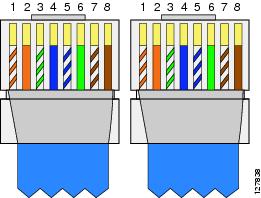 In straight cable connectivity is like as follows
RJ451 Connected to RJ452
Pin1------------------------------------- Pin1
Pin2------------------------------------- Pin2
Pin3------------------------------------- Pin3
Pin4------------------------------------- Pin4
Pin5------------------------------------- Pin5
Pin6------------------------------------- Pin6
Pin7------------------------------------- Pin7
Pin8------------------------------------- Pin8
- Connect a computer to a switch/hub's normal port.
- Connect a computer to a cable/DSL modem's LAN port.
- Connect a router's WAN port to a cable/DSL modem's LAN port.
- Connect a router's LAN port to a switch/hub's uplink port. (Normally used for expanding network)
- Connect two switches/hubs with one of the switch/hub using an uplink port and the other one using normal port.
What is Cross-over Network Cable?
- A crossover cable is a cable that is used to interconnect two computers by "crossing over" (reversing) their respective pin contacts.
- Sometimes you will use crossover cable, it's usually used to connect same type of devices.
- The reversing or swapping of cables varies, depending on the different network environments and devices in use.
- Examples of crossover cables are null modem cables, rollover cables and loopbacks.
A crossover cable can be used to:
- Connect two computers directly.
- Connect a router's LAN port to a switch/hub's normal port. (Normally used for expanding network)
- Connect two switches/hubs by using normal port in both switches/hubs.
In cross cable connectivity is like as follows:
RJ451 Connected to RJ452
Pin1----------------------------- Pin3
Pin2----------------------------- Pin6
Pin3----------------------------- Pin1
 Pin4----------------------------- Pin4
Pin5----------------------------- Pin5
Pin6----------------------------- Pin2
Pin7----------------------------- Pin7
Pin8------------------------------ Pin8


Can I use it to Make fast connections in the net?
ReplyDeleteThe speed of your internet still depends on your chosen network. (e.g Globe, PLDT etc.)
DeleteCan we make the range of our internet wider, through cabling?
ReplyDeleteNo. The range of your internet only depends on the antenna of your modem.
DeleteVery helpful information
ReplyDeleteHow very fast does the connection
ReplyDeleteAre there techniques you can use in order to intact it together like the wanted order of wires inside the RJ45?
ReplyDeleteWhat is the difference between a straight-through Ethernet cable, and a crossover Ethernet cable?
ReplyDelete